EQ Access Scan App
EQ Access Scan App
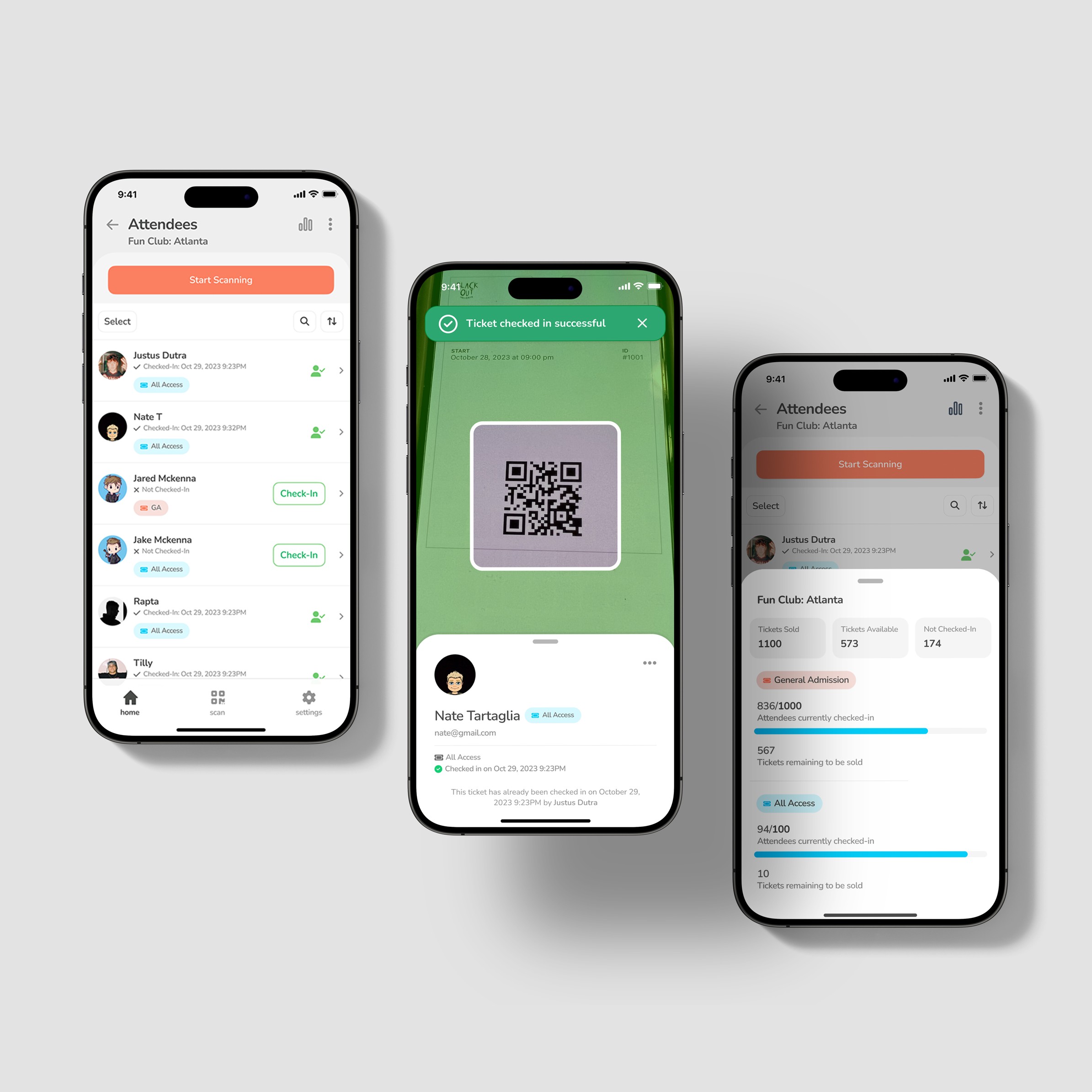
Most check-in tools try to show staff everything at the moment of scan, slowing the exact moment they mean to speed up, worst when venue wifi drops under a crowd. Research with scanners and attendees pointed the other way: at the gate, the only decision that matters is a fast, clear pass or fail. EQ Access Scan strips the scan to a camera frame and a single result, and defers attendee detail to where it actually gets used.
Year
2023
Client
EQ Tickets
Service
UX/UI Design
Role
Lead UX/UI Designer
01
Project Goals
Prioritize Scan Speed at the Gate
Objective: Make the scan-to-decision loop as fast and low-friction as possible so staff can clear lines without hesitation.
Success Metric: Time from QR scan to pass or fail result, and attendees processed per minute during peak entry.
Sub-Goals:
Reduce each scan to a single, unambiguous valid or invalid state
Remove non-essential data from the scan screen
Design a result state readable at a glance in low light and motion
Keep the scanner the default landing view, not buried behind menus
Stay Reliable Under Poor Connectivity
Objective: Keep check-in functioning when venue wifi and cell service are weak or intermittent.
Success Metric: Successful check-ins completed during degraded or dropped connections.
Sub-Goals:
Design a delay-tolerant scan flow rather than assuming live verification
Give staff a configurable scanning delay to match venue conditions
Surface connection and scanner status without interrupting the line
Support external scanner hardware for venues that need it
Preserve Security Without Slowing the Line
Objective: Prevent duplicate and fraudulent entry while keeping the scan fast.
Success Metric: Duplicate and invalid scan attempts caught, with no measurable added scan time.
Sub-Goals:
Log every scan attempt with timestamp and staff verification
Flag already-used and wrong-event tickets clearly
Separate the fraud decision from the detail view
Maintain an audit trail for post-event review
Move Detail to Where It Belongs
Objective: Give organizers deep attendee data and management tools, but after the scanning moment, not during it.
Success Metric: Adoption of the attendee management views for the tasks that require detail.
Sub-Goals:
Keep full attendee profiles in the attendee list, not the scanner
Provide manual check-in for edge cases
Surface event-level stats in a dedicated dashboard
Integrate with a companion management platform for deeper edits
02
Research and Discovery
The work started by separating what stakeholders wanted the product to show from what the people running check-in needed at the moment of scan. I interviewed event organizers, ticket scanners, and attendees, and observed live check-in lines to find where the real friction was.
Interviews and Surveys:
Conducted with event organizers and staff to identify common challenges and desired features in the check-in process.
Observation:
Attended live events to observe current check-in processes and identify areas for improvement.
Competitive Analysis:
Existing tools fell into two camps. Enterprise systems were feature-heavy and required staff training, which slowed onboarding for gig and volunteer staff. Lightweight scanners were fast but left organizers with no attendee management or audit trail. Neither camp treated connectivity as a first-class constraint.
Key Insights:
Scanners wanted a fast, obvious pass or fail decision, not a data screen to read
Attendees judged the event by how fast the line moved, not by what staff saw
Detail was valuable to organizers, but almost always after entry, not at the gate
Venue connectivity was inconsistent and unpredictable from event to event
Journey Mapping:
Mapping the entry flow showed the friction was concentrated in one place, the scan itself. Every extra element on the scan screen added a beat of hesitation per attendee, and that beat compounded across a line of hundreds. Downstream tasks like verifying identity, resolving disputes, and checking ticket type happened rarely and did not need to live at the gate.
03
Key Findings
Detail at the scan was a stakeholder assumption, not a user need.
Stakeholders asked for full attendee details on every scan. Interviews with scanners and attendees pointed the other way. At the gate, the only decision that matters is whether the person gets in. Loading the scan screen with profile data slowed the exact moment it was meant to speed up.
Speed is the attendee's experience of the event.
Attendees never saw the staff interface. What they experienced was the line. The faster and more decisive the scan, the better the event felt before it started. This reframed speed from a nice-to-have into the primary design target.
Connectivity is a design constraint, not an edge case.
Wifi and cell service varied widely between venues and often degraded as crowds arrived. A scan flow that assumed instant live verification would fail exactly when it was needed most. The product had to tolerate delay and give staff control over timing.
Detail still matters, just later.
Attendee data was useful for organizers. The insight was about placement, not removal. Moving detail into the attendee management views kept it available for the tasks that needed it without taxing the scan.
04
Wireframing and Prototyping
Lo-Fi Sketches:
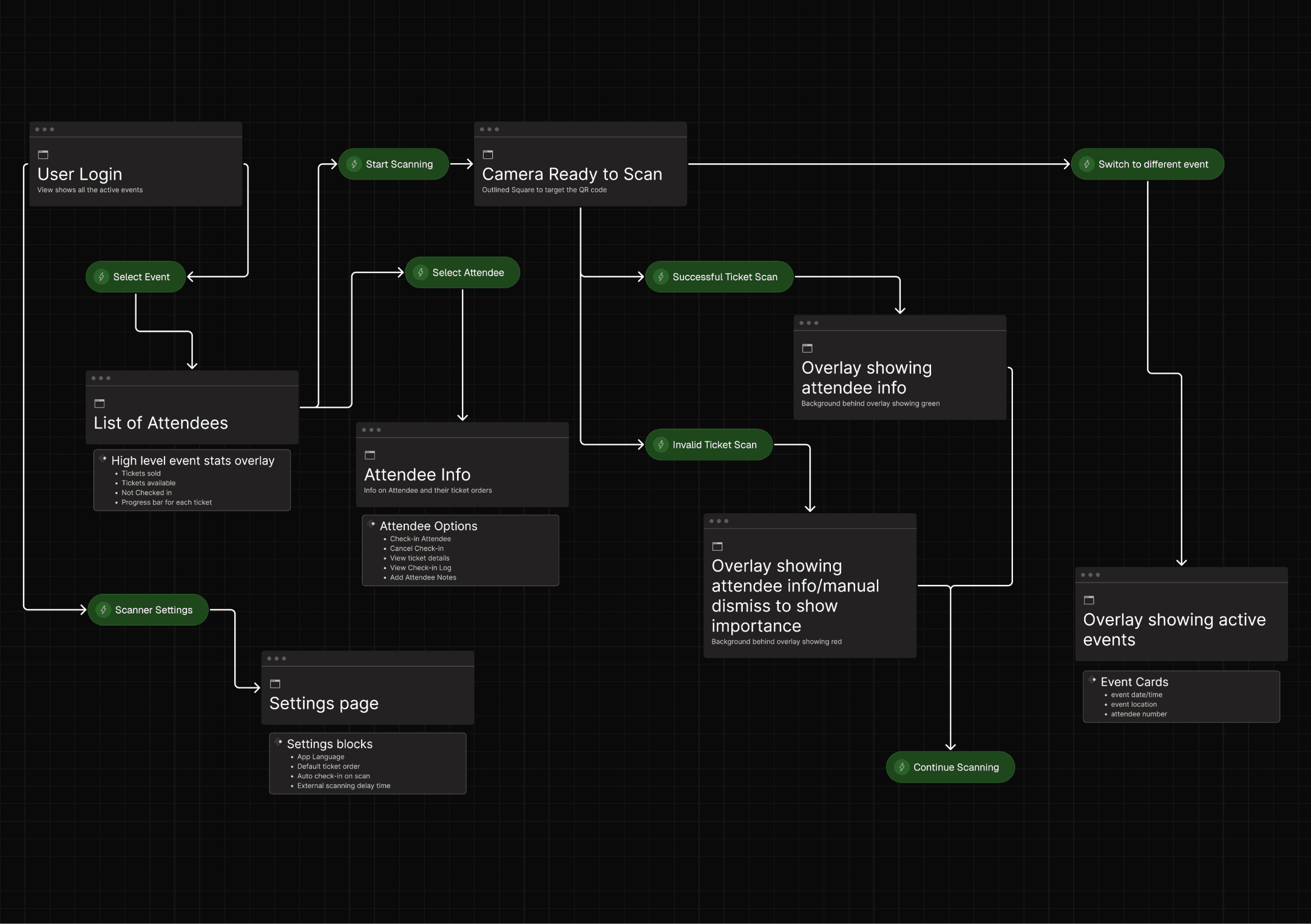
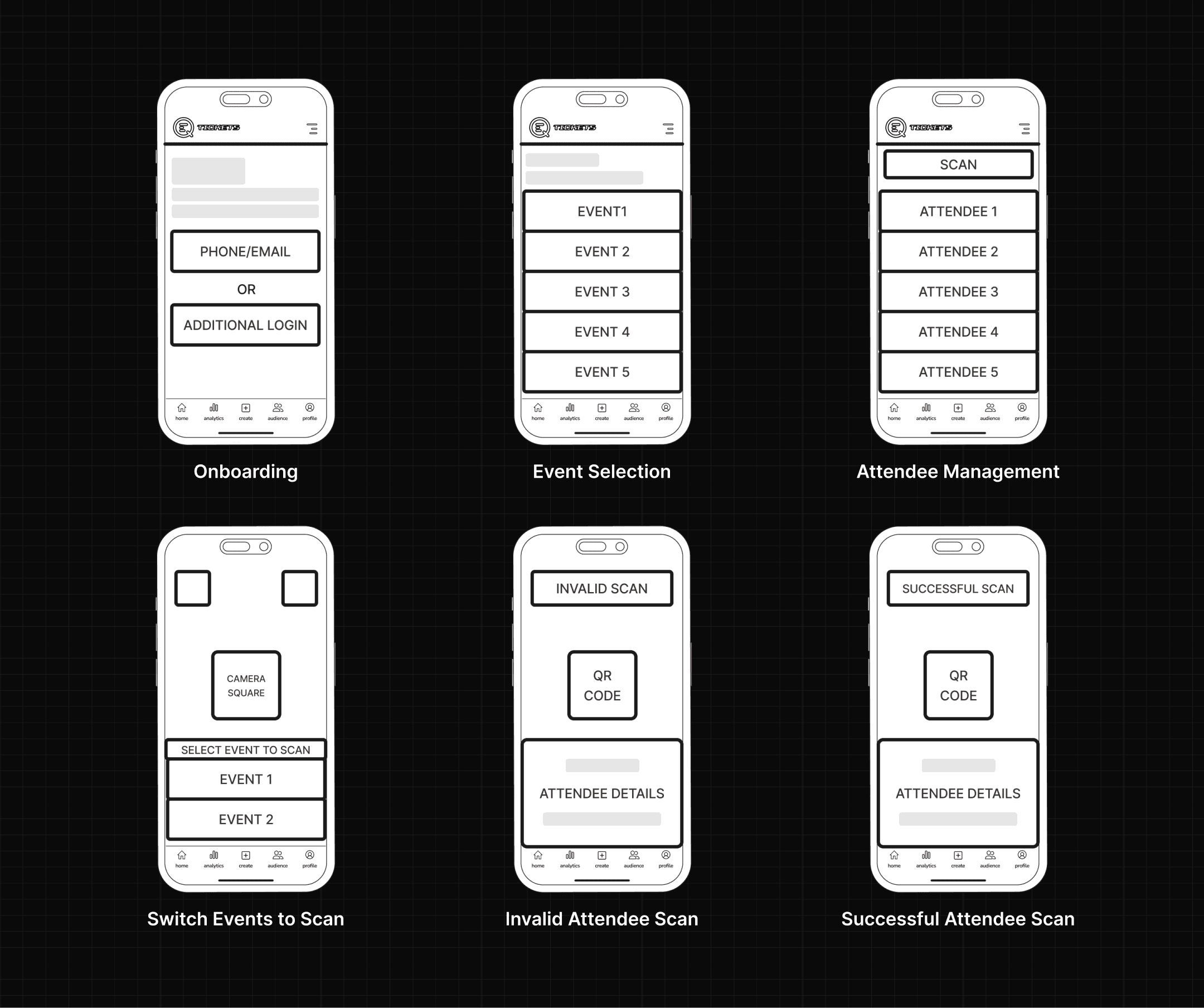
Early sketches tested how little could live on the scan screen. I explored versions stripped down to the camera frame and a single result state, deliberately holding attendee detail off the gate view to see what staff actually missed.
Mid-Fi Prototypes:
Mid-fi flows validated the stripped-down scan against the fuller version stakeholders had requested. Testing the two side by side with scanners made the case concrete. The simpler flow was faster and drew fewer questions, and the detail nobody used at the gate was not missed.
Hi-Fi Prototypes:
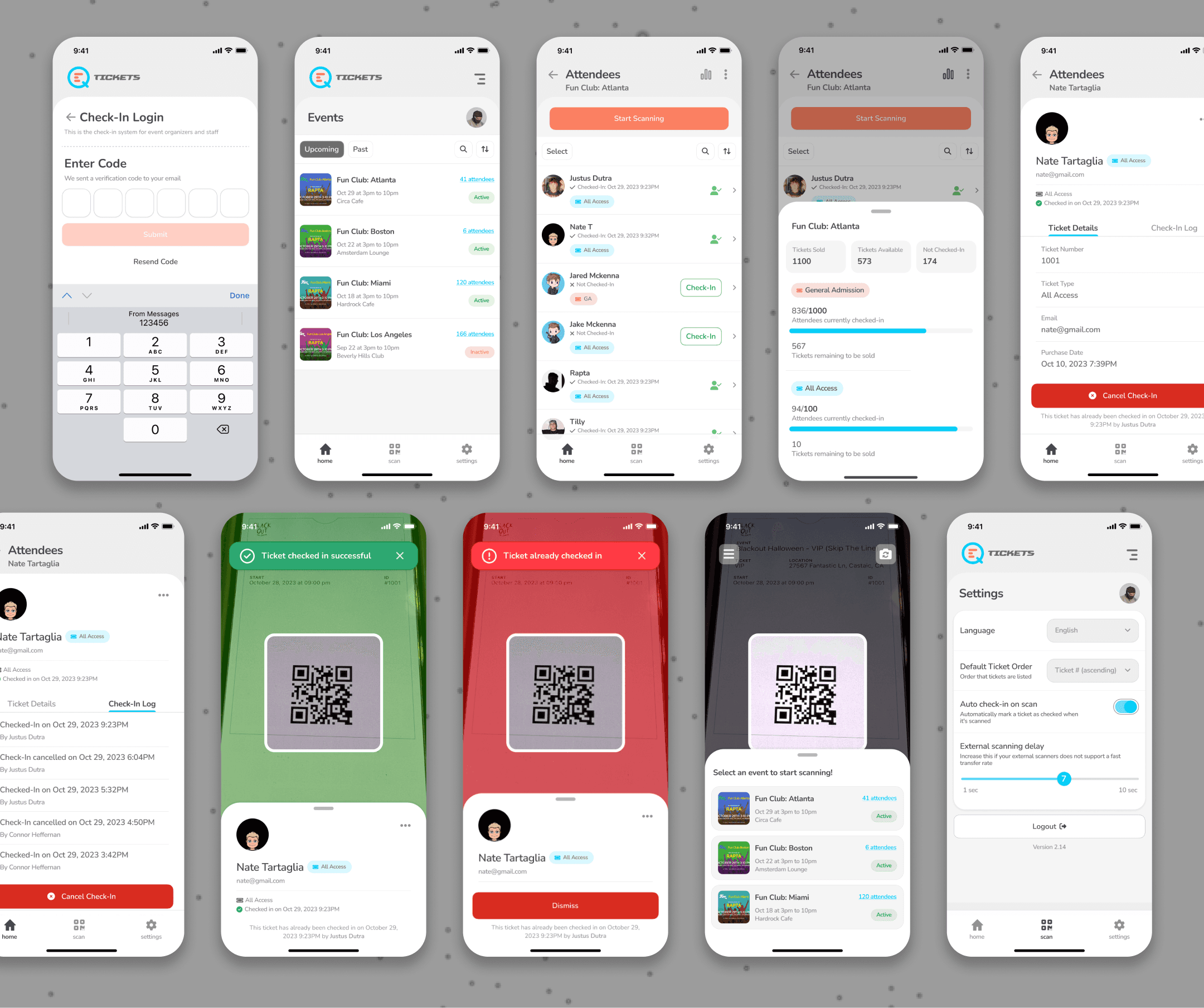
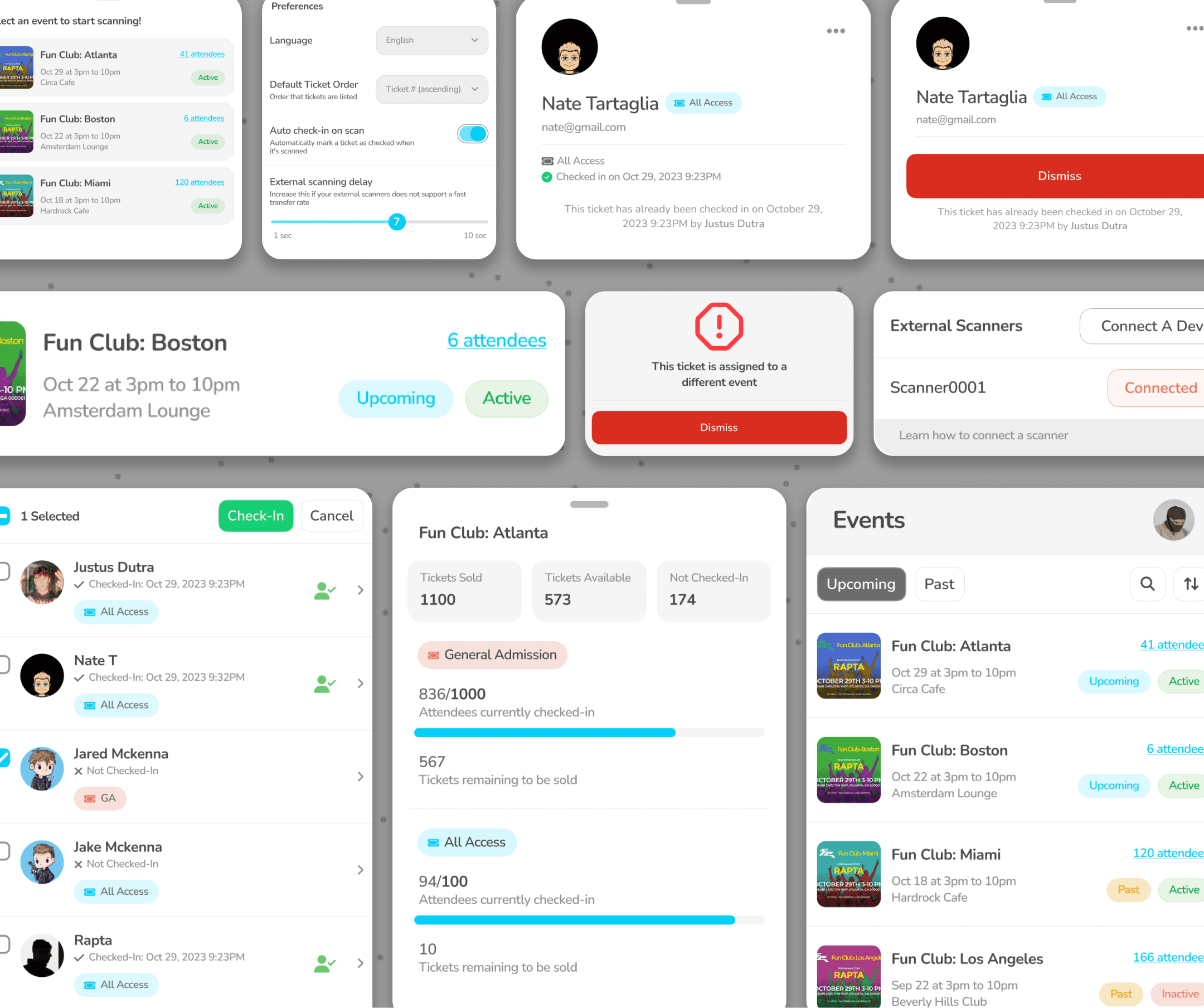
Hi-fi work focused on the result state and the recovery paths. The pass state uses a full-screen color confirmation readable at a glance, invalid and wrong-event states are visually distinct, and a manual check-in path covers cases where scanning is not possible. A configurable scanning delay lets staff tune the flow to the venue's connection.
Design System:
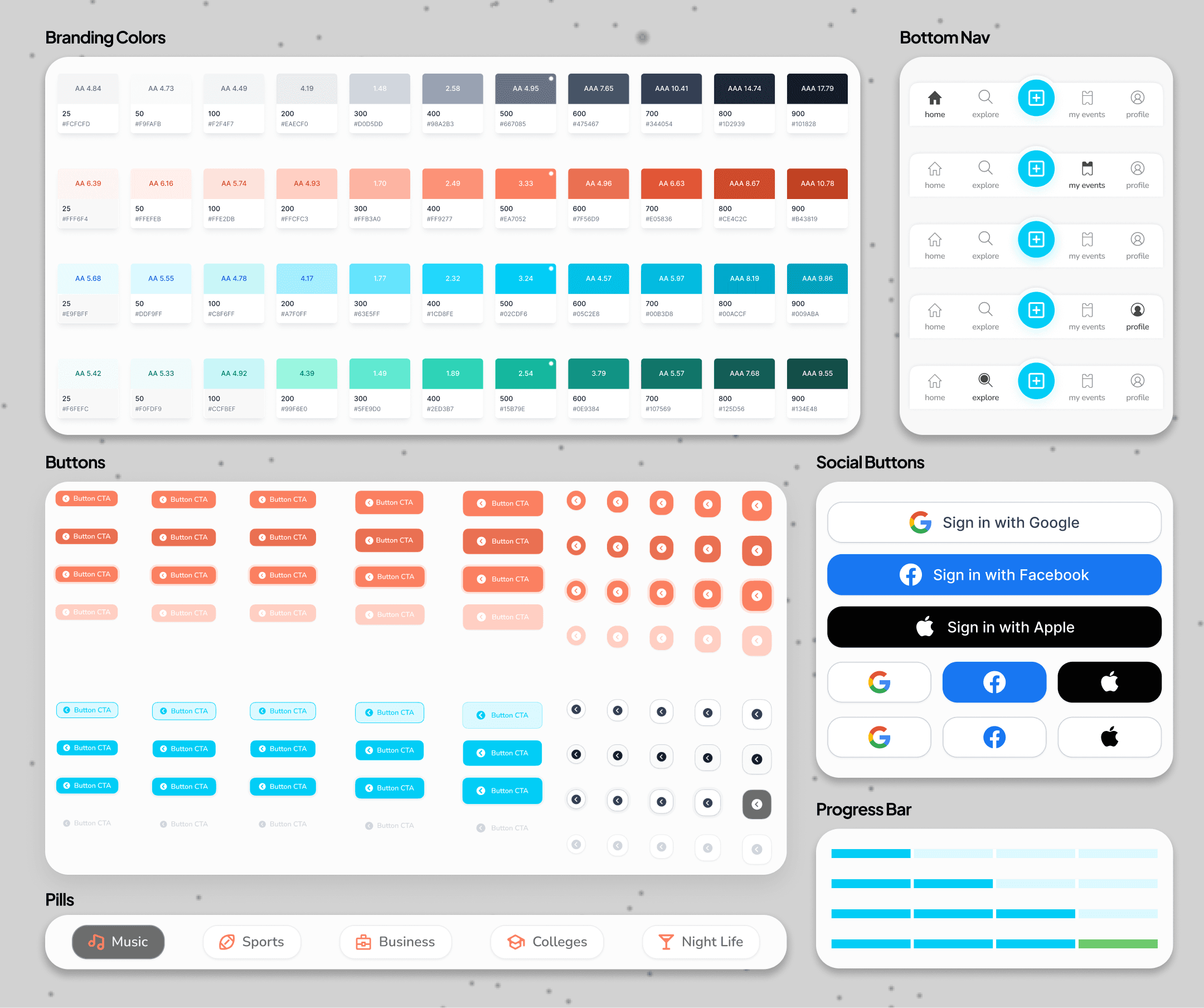
Reusable pieces included the scan result states (success, invalid, wrong event), the attendee list row with check-in status, status badges for ticket type, access level, and check-in state, the event stats dashboard cards, and the external scanner connection pattern.
05
Key Features
Complete Attendee Profiles:
Each attendee’s profile includes their ticket type, contact details, purchase date, and any additional event-specific information, helping staff verify identities and manage access seamlessly.
Real-Time Check-In Status:
The system logs each check-in with a timestamp and staff verification, ensuring accurate tracking of attendee entries.
Check-In History & Audit Trail:
Staff can view a complete log of all check-in attempts, including successful check-ins, cancellations, and re-entry attempts, helping to identify inconsistencies and prevent unauthorized access.
Fraud Prevention & Security:
By tracking check-in attempts and cancellations, the app ensures that tickets cannot be reused fraudulently, maintaining event security and trust.
Instant Verification Feedback:
The system provides immediate confirmation of ticket validity, allowing event staff to efficiently manage high-traffic check-ins.
Color-Coded Scan Results:
A green overlay confirms successful check-ins, while an alternative color (e.g., red) indicates invalid or duplicate entries, ensuring quick and clear decision-making.
Fraud Prevention & Security:
Each scanned ticket is logged in the system, preventing duplicate use and unauthorized re-entry.
Optimized for Speed:
The streamlined scanning process enables staff to process attendees quickly, reducing wait times and ensuring a smooth check-in experience.
At-a-Glance Check-In Status:
The attendee list clearly indicates who has checked in and who has not, enabling staff to track attendance efficiently.
Quick Check-In Actions:
Staff can manually check in attendees with a single tap if needed, providing flexibility beyond QR code scanning.
Minimal Yet Informative Layout:
The simplified interface ensures that only the most relevant details—such as ticket type and check-in status—are displayed, reducing distractions.
Seamless Event Management Integration:
A dedicated event management platform works alongside this app, allowing organizers to access deeper insights and edit attendee data when necessary.
06
Results
60% faster scan-to-decision at the gate
Stripping the scan screen to a camera frame and a single result cut the time from QR scan to pass or fail from 4 seconds to 1.6 seconds, letting staff clear lines without hesitation.
32 attendees processed per minute at peak
The speed-first flow raised peak throughput from 15 to 32 attendees per minute, measured during the busiest entry window across 12 events.
98% of check-ins completed during degraded connectivity
The delay-tolerant scan flow and configurable scanning delay kept check-in functioning through weak or dropped connections, with 98% of scans completing successfully even when venue wifi and cell service failed.
140 duplicate and fraudulent entries caught with no added scan time
Logging that runs behind the scan rather than in front of it flagged 140 already-used and wrong-event tickets across 12 events, with no measurable increase in scan time.
83% reduction in staff onboarding time
Because the gate view carries no data to read or interpret, new and volunteer staff were scanning confidently after 5 minutes instead of the 30 minutes typical of the enterprise tools organizers had used before.
Next
In today’s dynamic work environment, effective project management is crucial for team success. Our goal was to design a user-centric project management tool that enhances productivity through a dynamic dashboard, collapsible sidebar navigation, and multiple project task views.