HeffOS — Personal Job Search OS
HeffOS — Personal Job Search OS
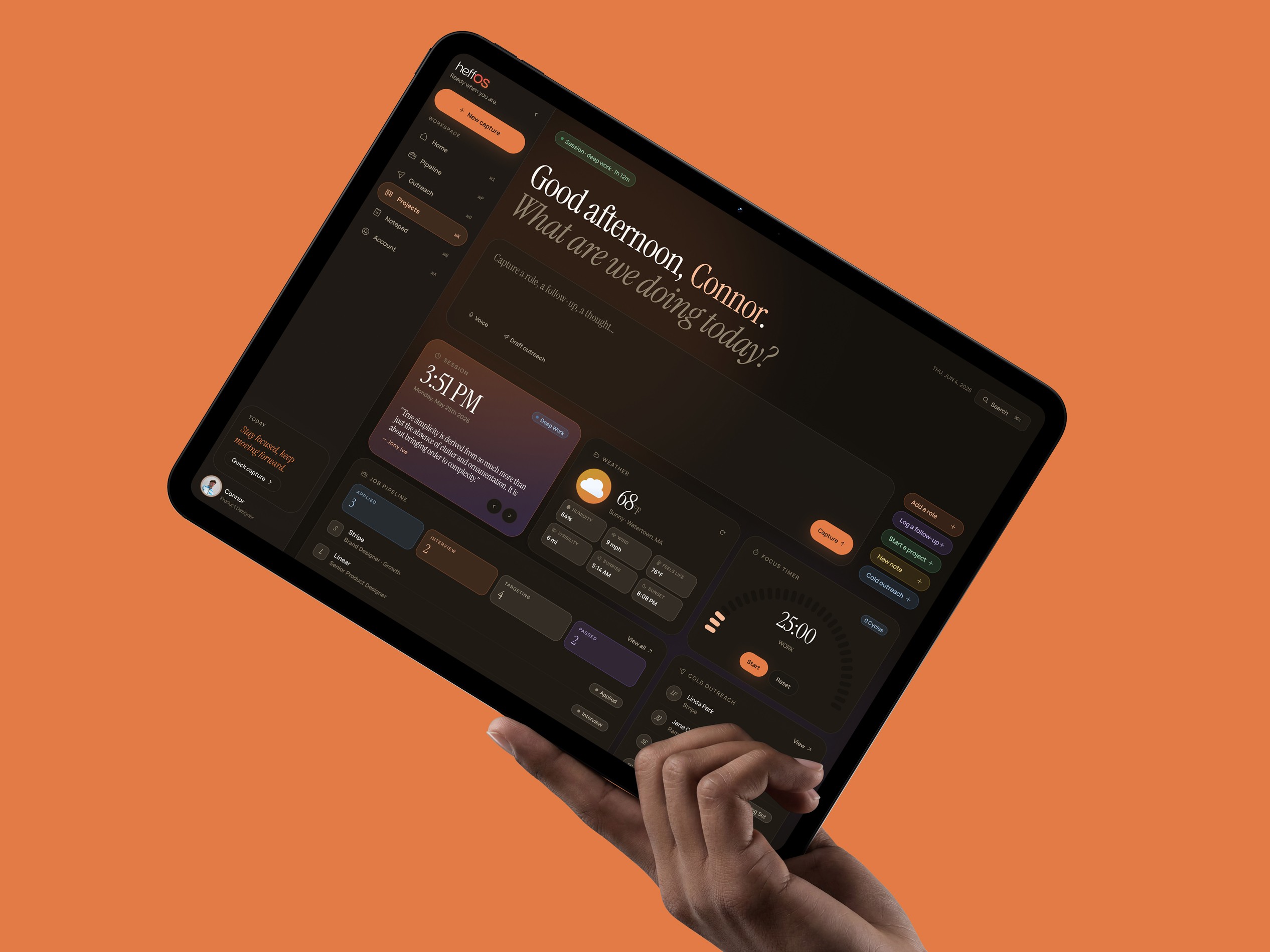
Most job searches run across five or six disconnected tools. Tracking roles, managing outreach, generating materials, and preparing for interviews each happen in separate places with no shared context, so every session starts from scratch. HeffOS is a single system that connects all of those surfaces, with a persistent background profile and an AI layer that applies it across every tool automatically. Built and deployed as a real Next.js app, the case study covers both the design decisions and the product reasoning behind treating a job search like a system rather than a series of tasks.
Year
2026
Client
HeffOS
Service
UX/UI Design
Role
Lead UX/UI Designer & Developer

01
Project Goals
Replace a fragmented multi-tool job search with one connected system
Objective: Build a single product that covers pipeline, outreach, materials, notes, and interview prep without sending the user to another tool.
Success Metric: A user can move from finding a role to generating a cover letter, sourcing a contact, writing an outreach email, and launching interview prep without leaving the app.
Sub-Goals
Single persistent background profile that every surface reads from
AI tools scoped to the active role or contact, not generic
Navigation that reflects the actual job search workflow
Mobile-first so the system works in the moments when job searching actually happens
Build an AI layer that produces personalized, consistent output
Objective: Make every AI-generated output, cover letters, cold emails, interview questions, and follow-ups, feel specific to the user and the role rather than generic.
Success Metric: Generated output requires minimal editing before use because the context it draws from is already accurate and complete.
Sub-Goals
Background profile with career timeline, skills, and portfolio injected into every generation
User-defined hard rules applied at the system prompt level, not as suggestions
Role-specific and contact-specific context included per tool
No re-entering background across tools or sessions
Design a system that scales across surfaces without losing coherence
Objective: Keep the product feeling like one thing as it grows to six pages and nine-plus AI tools.
Success Metric: Patterns established on one surface (AI panel, form layout, mobile takeover) translate to every other surface without redesign.
Sub-Goals
Design token system for all colors, spacing, typography, and radii
M_PAGE mobile takeover pattern reused across all pages
Shared PromptModal component powering every AI tool
Consistent desktop two-panel layout across Pipeline and Outreach
Ship a real, working product rather than a prototype
Objective: Prove the system under real conditions with real data, real AI responses, and a real device.
Success Metric: The app is deployed, accessible at a live URL, and functions end to end on iOS Safari.
Sub-Goals
KV/Redis persistence so data survives sessions
Claude API integration producing real, personalized AI output
Mobile experience validated on an actual device
iOS-specific constraints around audio, speech, and drag behavior solved in the build

02
Research and Discovery
Built as designer-as-user during an active job search. Discovery mapped the existing tool landscape against the specific friction of switching between them constantly, losing context at every handoff, and getting generic AI output because nothing knew who the user was.
Competitive Analysis
Pipeline trackers (spreadsheets, dedicated job trackers) — useful for tracking status but no AI layer and no connection to outreach or materials generation.
AI writing tools (general LLM chat, resume builders) — flexible but stateless. They produce generic output because they have no persistent knowledge of the user's background, voice, or specific roles.
Outreach CRMs (LinkedIn, sales-focused tools) — built for sales teams, not job seekers. No pipeline context, no materials generation, and no interview prep.
Interview prep tools (peer mock platforms, static question banks) — disconnected from the roles being tracked. Generic questions rather than role-specific practice.
The gap across all four: none of them share data. A job seeker using all of them still starts from scratch every time they switch tools.
User Types
Active job seekers managing a high-volume search across multiple roles and companies
Design and tech candidates who need polished, personalized materials at every stage
Solo job seekers without recruiter support who are running the entire process themselves
Key Insights
Context loss between tools is the core UX problem, not any individual feature
AI output is only as good as the context it has, and most tools have none
Most job seekers track their pipeline in a spreadsheet because nothing purpose-built feels like a real product
Outreach and pipeline management are the same workflow, but no tool connects them
Journey Mapping
The core flow runs role discovery → pipeline tracking → contact sourcing → cold outreach → material generation → interview prep → follow-up.
Friction concentrates at two seams:
Re-entering background context, losing sight of the role while generating materials, and starting interview prep without knowing which questions to practice. HeffOS was designed to remove those handoffs by keeping the workflow inside one system.
03
Key Findings
The product's value is in the connections, not the features.
A better cover letter tool alone doesn't help if the user has to leave their pipeline to use it, re-enter their background, and copy the output back manually. Every individual surface, pipeline tracking, outreach, notes, exists in other tools. What doesn't exist is one product where they all talk to each other.
A persistent background profile is the highest-leverage design decision in the system.
AI tools produce generic output by default because they have no context about who the user is. Making every generation draw from a single stored profile, career timeline, skills, portfolio, and hard rules, turned the AI layer from a text box into a tool that actually knows the user.
A job search is a project and it deserves a project management layer.
Roles, contacts, tasks, and notes aren't separate categories. They are one interconnected project with dependencies and a timeline. Designing them as connected surfaces rather than isolated pages was the structural decision that made HeffOS feel like a system rather than a collection of tools.
Shipping the product proved things prototyping couldn't.
A prototype would have validated the layout. Deploying the real app validated the system: that prompt engineering holds under real AI responses, that data persists reliably across sessions, and that the mobile experience survives on an actual iOS device with real audio and speech constraints.


04
Wireframing and Prototyping
Lo-Fi Sketches (Figma):
Architecture first. The first design decisions were about data relationships and page connections, not screens.
Mapped how roles, contacts, tasks, and notes reference each other before any visual treatment
Established the two-panel desktop layout and M_PAGE mobile takeover as structural patterns
Defined the AI tools panel as a shared right-panel pattern across Pipeline and Outreach
Tested the core cross-surface workflow: role tracked → contact sourced → email generated
Mid-Fi Figma Prototypes:
Built clickable flows for:
Built clickable flows for:
Role added → AI Tools panel → cover letter, interview prep, outreach message
Contact found → saved to Outreach CRM → cold email generated
Job description added → interview prep launched
Validated that the right-panel AI tools pattern worked across both Pipeline and Outreach, and that context stayed scoped to the active role or contact rather than going generic between surfaces.
Hi-Fi Interactive Prototypes:
Applied the HeffOS design system, with the priority on coherence across all six pages.
Refined the PromptModal component to work as both a desktop centered modal and a mobile bottom sheet
Built the Pipeline and Outreach CRM at full fidelity with real AI tool states
Stress-tested the design system across surfaces to confirm token consistency
Validated the mobile experience on device, including z-index architecture and iOS-specific interaction fixes
Design System Development:
Built the full HeffOS system from the token level up.
Core components included:
CSS custom properties for all colors, spacing, radii, and shadows
M_PAGE mobile takeover pattern with standardized header (back arrow, centered title, peach Save button)
PromptModal shared across all nine AI tools (desktop modal + mobile bottom sheet)
Pill buttons, layered card shadows, and ambient pastel surface system
Dark mode support via data-theme attribute with full token coverage
Tokens and mode variables were hand-tuned directly in code rather than generated, giving precise control over the warm off-white base and peach accent that define HeffOS's visual identity across every surface.

05
Key Features
Role-to-Contact Workflow:
The Pipeline and Outreach CRM are designed as one connected workflow. A role tracked in the pipeline can trigger contact sourcing, which creates an outreach contact pre-filled with context, which generates a personalized cold email — all without leaving the app or re-entering information at any step.
AI Tools Scoped Per Surface:
Pipeline roles surface AI tools for cover letters, tailored resumes, interview prep, and follow-ups. Outreach contacts surface tools for cold emails and hiring manager finding. Each tool reads the context of the specific role or contact it is opened from, so output is relevant without any extra setup.
Cold Outreach Finder:
The built-in contact finder queries Hunter.io by company domain, groups results by design contacts and others, and saves a selected target as a new contact pre-filled with six outreach context fields. Sourcing and CRM entry happen in one step rather than two separate tools.
Status-Driven Pipeline:
Both the job pipeline and outreach CRM are organized by status progression. Roles move from Targeting through Applied, Interview, and Passed. Contacts move from Targeting through Contacted, Responded, and Meeting Set. Status is the organizing principle across both surfaces so the user always knows where every role and contact stands at a glance.
Single Dispatch Endpoint:
All nine AI tools across Pipeline and Outreach route through one centralized API endpoint, dispatching by tool ID. A single point of control means prompt engineering improvements and system-level rules apply everywhere at once rather than tool by tool.
Background Profile as Context:
The user's career timeline, skills, portfolio, and contact information are stored once in Settings and injected automatically into every generation. There is no re-entering background per tool, per session, or per role — the system already knows who the user is.
Hard Rule Injection:
User-defined rules in the additional context field are applied at the system prompt level across all tools, not as suggestions. Preferences like tone, phrases to avoid, or specific framing are enforced rather than hoped for, so output stays consistent with the user's voice.
Role and Contact Scoped Output:
Each AI tool reads the context of the active role or contact in addition to the background profile, so a cover letter for one role and an outreach email for a different contact are each generated from the right context automatically, with no manual switching.
Job Search as a Project:
A job search involves real project work: researching companies, prepping materials, managing timelines, and coordinating follow-ups. The Kanban board treats it that way, letting users break an application down into tasks and track them visually rather than keeping a mental checklist or a separate spreadsheet alongside the tool.
Drag-and-Drop Task Board:
Tasks move across columns by drag, giving users a clear, tactile way to advance their work. Each project gets its own board with task cards, descriptions, and a context panel for details, so nothing about an active search gets buried in a flat list.
Mobile-Native Drag Behavior:
Drag-and-drop on iOS long-press triggers the native system callout (Copy, Look Up, Translate) which intercepts the gesture before a drag can start. Solving this required switching to a touch-specific sensor and applying touch-action: none and WebkitTouchCallout: none on all draggable wrappers. The fix was a product decision made so the core interaction works reliably on the device the product is built for.
Multi-Project Workspace:
Each project, whether an active application, a portfolio update, or a reach-company prep, lives in its own scoped workspace with its own board and task set. Multiple projects run in parallel without bleeding into each other, so a high-volume search with ten active roles stays organized rather than becoming a pile.
Next
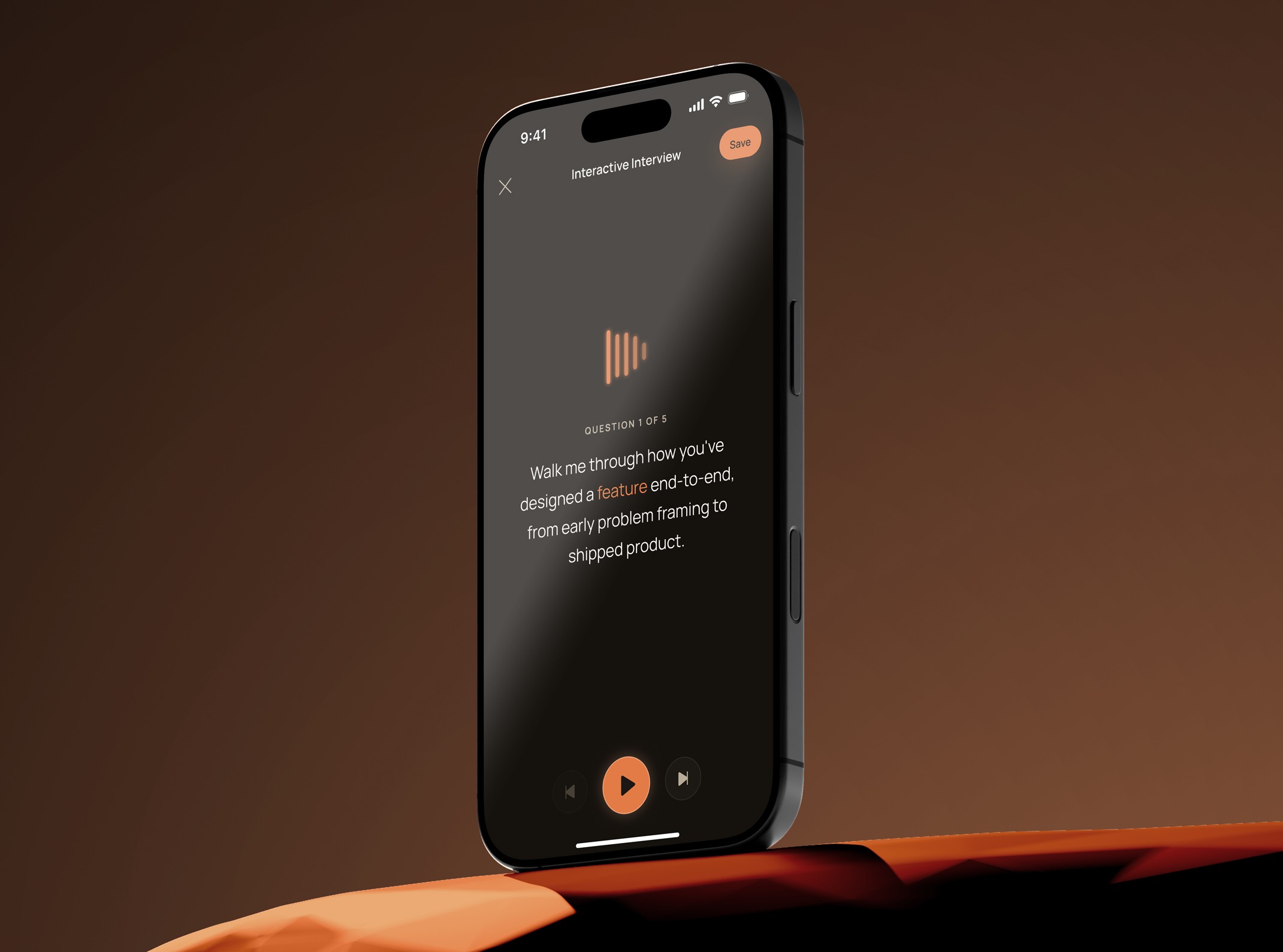
Interview Prep turns a tracked role in HeffOS into a live, spoken mock interview. An AI interviewer asks questions aloud, the user answers by voice, and each answer returns coaching feedback with a recommended response. It targets the highest-value, least-supported part of prep: rehearsing delivery out loud, something reading silently can't build and human mock interviews can't schedule on demand.