EQ Event Creation
EQ Event Creation
Event creation is where most ticketing platforms lose their casual hosts. Setup asks for every decision at once, so a first-time organizer hits the same wall as a professional planner. Research surfaced two forces pulling against each other: hosts needed the process simplified, but still wanted each event to feel like its own. EQ Event Creation resolves that with guided steps, complexity defaulted out of the way, and everything editable after the fact.
Year
2024
Client
EQ Tickets
Service
UX/UI Design
Role
Lead UX/UI Designer
01
Project Goals
Make Event Creation Finishable by Anyone
Objective: Turn a dense, multi-decision setup into a process a first-time host can complete without abandoning it.
Success Metric: A casual host can publish a complete, ticketed event page in a single sitting without outside help.
Sub-Goals:
Break setup into guided, manageable steps rather than one long form
Let hosts save and return without losing progress
Use prompts and visual cues to carry the user through each decision
Default advanced options out of the primary path
Balance Simplicity Against Customization
Objective: Keep the flow simple while still letting each event reflect its own occasion.
Success Metric: Hosts customize branding, ticketing, and add-ons without leaving the guided path.
Sub-Goals:
Make customization opt-in, not a required gate
Provide flexible templates hosts can modify rather than build from scratch
Keep advanced controls available but tucked out of the default view
Treat visual identity, flyer, colors, description, as fast early wins
Remove the Pressure of Finality
Objective: Let hosts create before every detail is settled.
Success Metric: Events created and published with details edited after the fact.
Sub-Goals:
Make every event field editable after creation
Allow publishing with incomplete information and filling gaps later
Support real-time adjustments to live events
Reduce the perceived stakes of hitting create
Give Ticketing Real Depth Without Complexity
Objective: Support serious ticketing needs without pushing that complexity onto simple events.
Success Metric: Hosts configure multi-tier ticketing and add-ons through the same guided flow that serves basic events.
Sub-Goals:
Layer advanced sales controls beneath a simple default
Support multiple ticket tiers, perks, and add-ons as optional depth
Keep pricing and availability controls readable, not spreadsheet-like
Let event-page add-ons scale from none to many without changing the flow
02
Research and Discovery
The work started by understanding how differently hosts approach event creation. I interviewed and surveyed a deliberately wide range, from professional event planners to people organizing a one-off casual gathering, to find where their needs overlapped and where they split.
Competitive Analysis:
Existing creation tools tended to optimize for one end of the spectrum. Professional platforms were powerful but overwhelming for casual hosts, front-loading every logistical decision. Simpler tools were approachable but capped what an event could become, with no real ticketing depth or customization. Neither let the same flow serve both a wedding and a corporate conference.
Interviews and Surveys:
Conducted with a diverse group of event hosts, ranging from professional event planners to individuals organizing casual gatherings. The goal was to identify common pain points and desired features.
User Types:
Professional and experienced event planners
Casual, first-time, and one-off hosts
Attendees experiencing the finished event page
Persona Development:
Created detailed user personas to represent the different types of event hosts, including their goals, motivations, and challenges.
Key Insights:
Hosts found event setup overwhelming because of how much it asked for at once
The same hosts still wanted each event to feel distinct, not templated
Detail and finality were sources of pressure, hosts rarely had everything ready at creation
The needs of casual and professional hosts overlapped more than the tools assumed
Journey Mapping:
Mapping the creation journey showed the friction was concentrated at the start, where the volume of required decisions caused hesitation and abandonment. Customization, ticketing depth, and promotion mattered, but as things hosts wanted to reach, not walls they wanted to hit first.
03
Key Findings
Complexity, not capability, was the barrier.
Hosts were not blocked by missing features. They were blocked by how much the setup demanded up front. The volume of logistics, ticketing, and communication decisions made creation feel overwhelming before any single part was actually hard. The fix was sequencing and defaults, not fewer capabilities.
Simplicity and customization were both non-negotiable.
The obvious tradeoff was to simplify by limiting choice, but research killed that path. Hosts wanted each event to reflect its own nature, a corporate conference, a wedding, a community meetup, while still wanting the process to feel simple. The product had to deliver both, which meant making customization optional depth rather than upfront cost.
Finality was a source of friction.
Hosts rarely had every detail settled when they sat down to create. Treating creation as a commitment raised the stakes of starting. Making everything editable afterward lowered the barrier to beginning and let hosts publish before they were fully ready.
The spectrum of hosts shared one flow.
Casual and professional hosts were closer in need than the market assumed. Rather than building separate paths, the insight was to serve both with a single progressive flow, simple by default, deep on demand.
04
Wireframing and Prototyping
Lo-Fi Sketches:
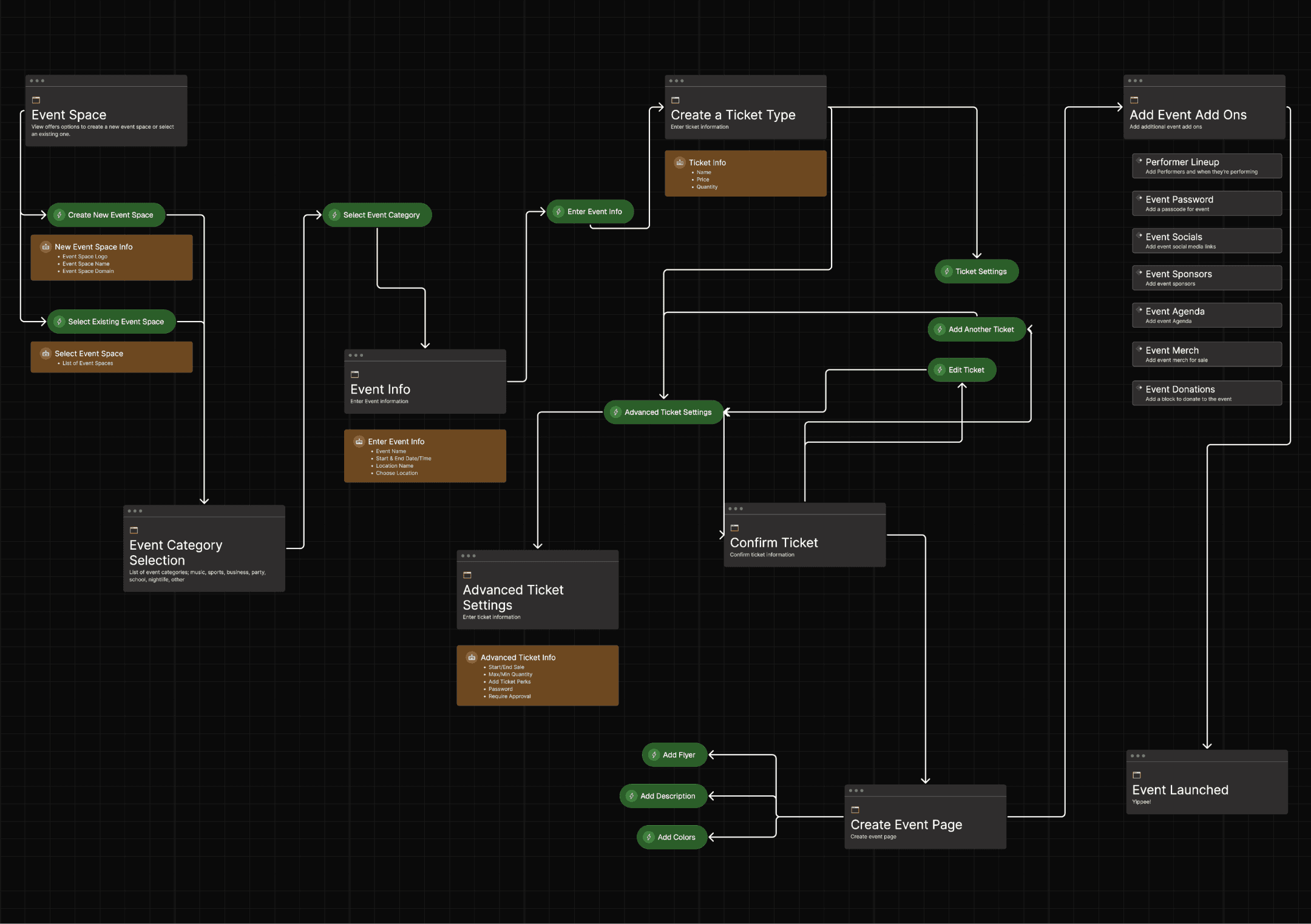
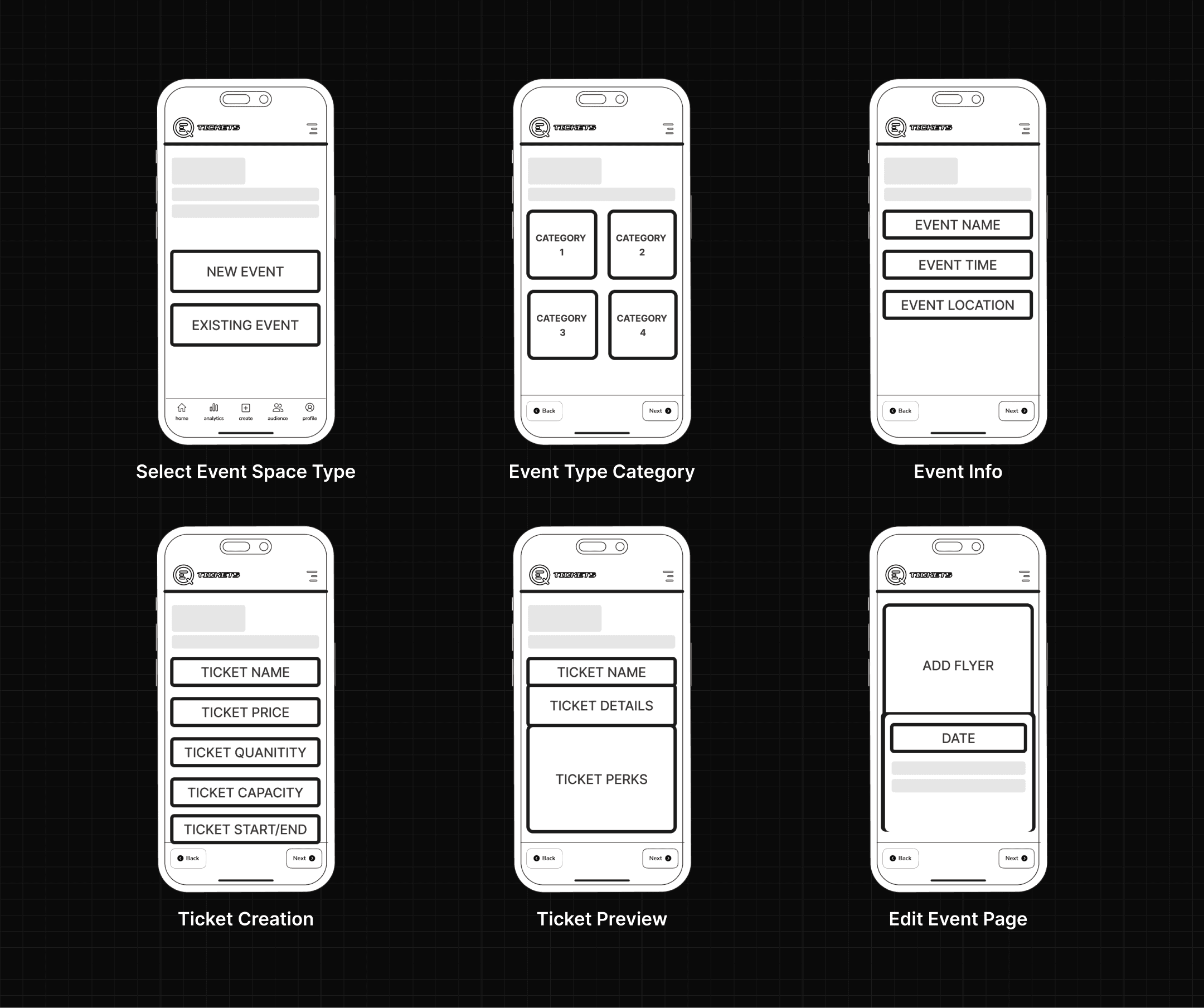
Early sketches focused on sequencing, testing how to break a dense setup into steps that each carried one clear decision. The goal was to find the order that reduced hesitation without hiding anything a host would need.
Mid-Fi Prototypes:
Mid-fi flows validated the step-by-step structure and the opt-in model for customization. Testing confirmed that defaulting advanced ticketing and add-ons out of the primary path let casual hosts move quickly while leaving depth reachable for those who wanted it.
Hi-Fi Prototypes:
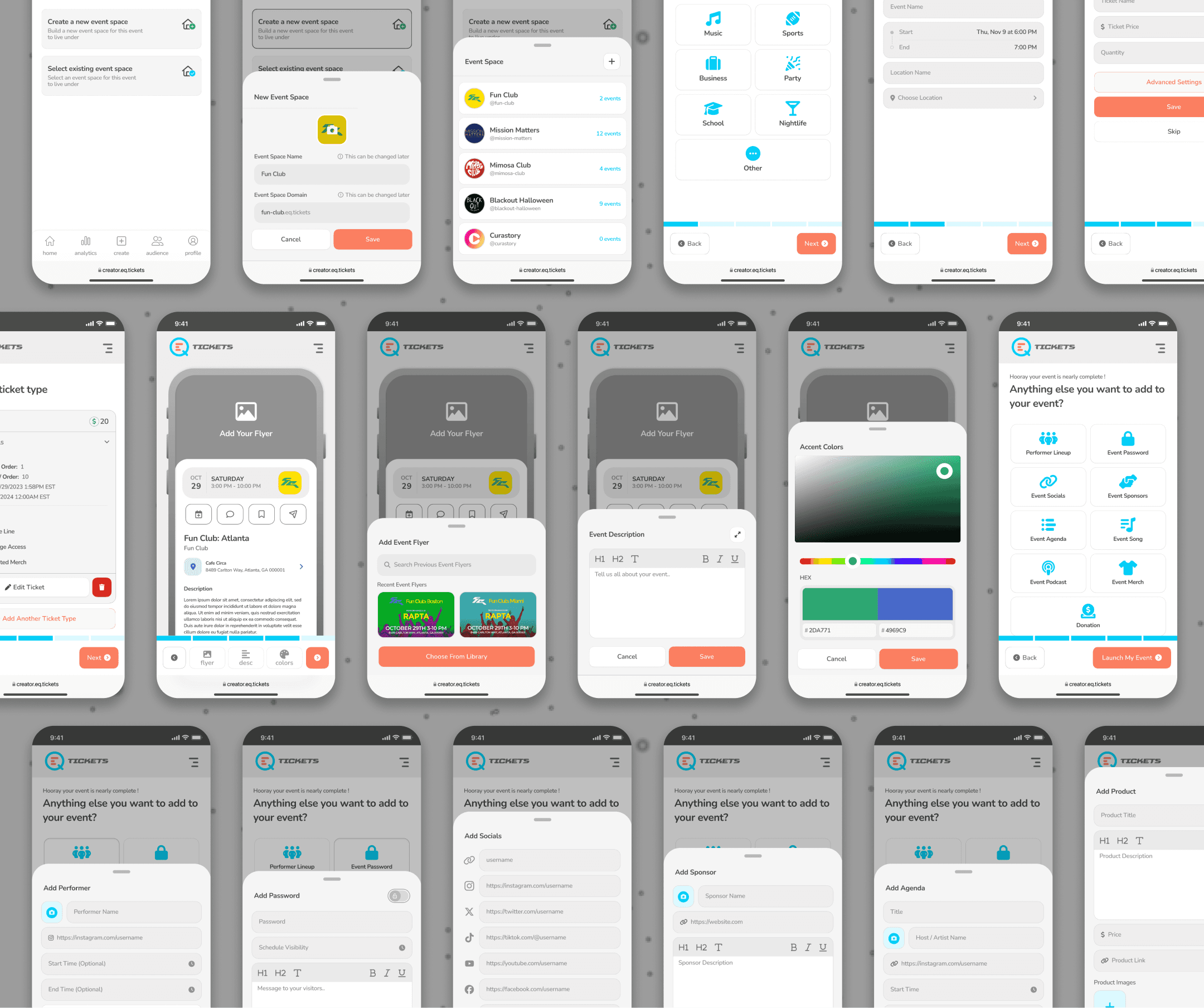
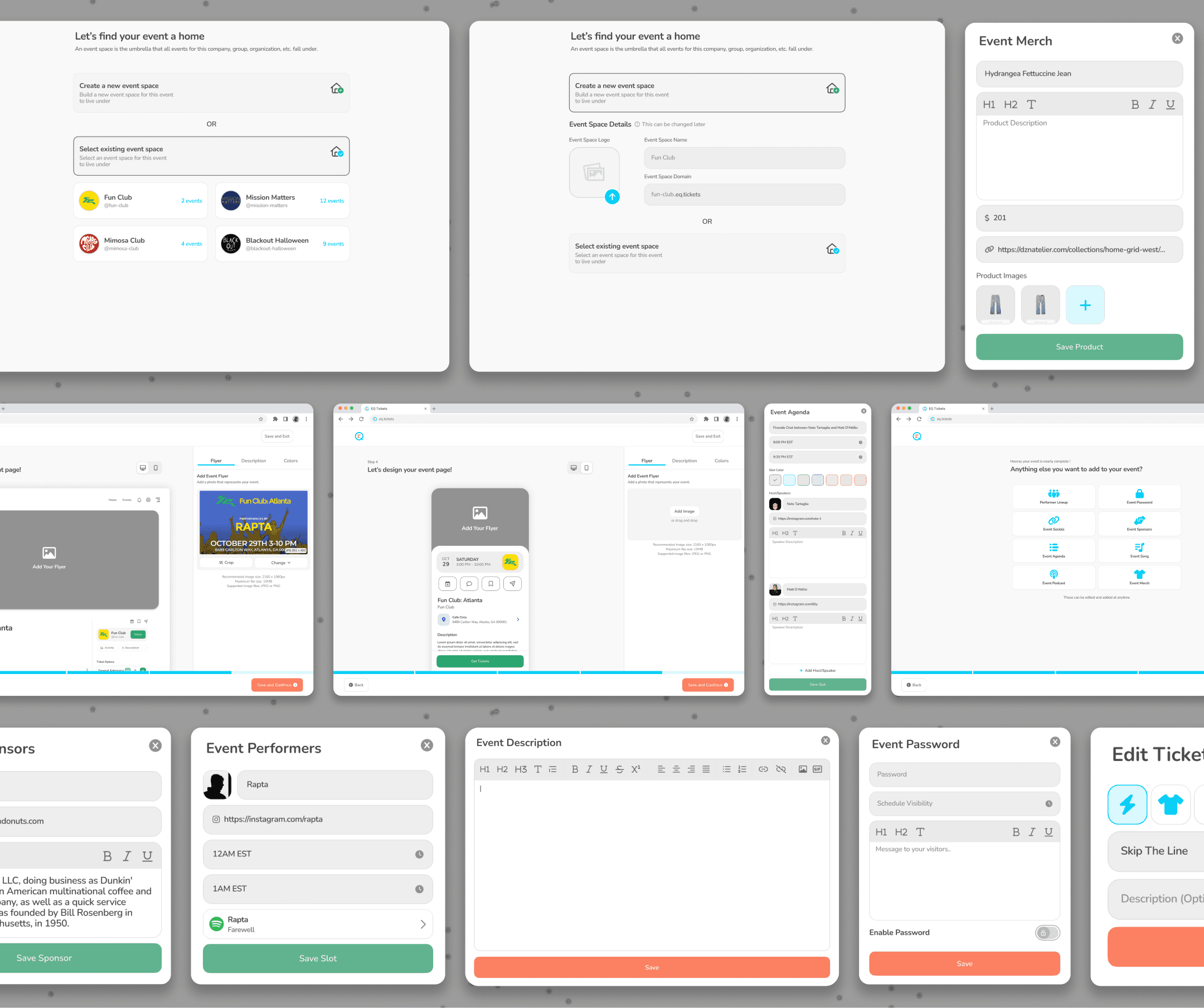
Hi-fi work focused on the event page editor and the ticketing flow, the two places where the simplicity-versus-depth tension was sharpest. The editor supports dual mobile and desktop previews so hosts see the real result as they build, and ticketing layers advanced sales controls beneath a simple default.
Design System:
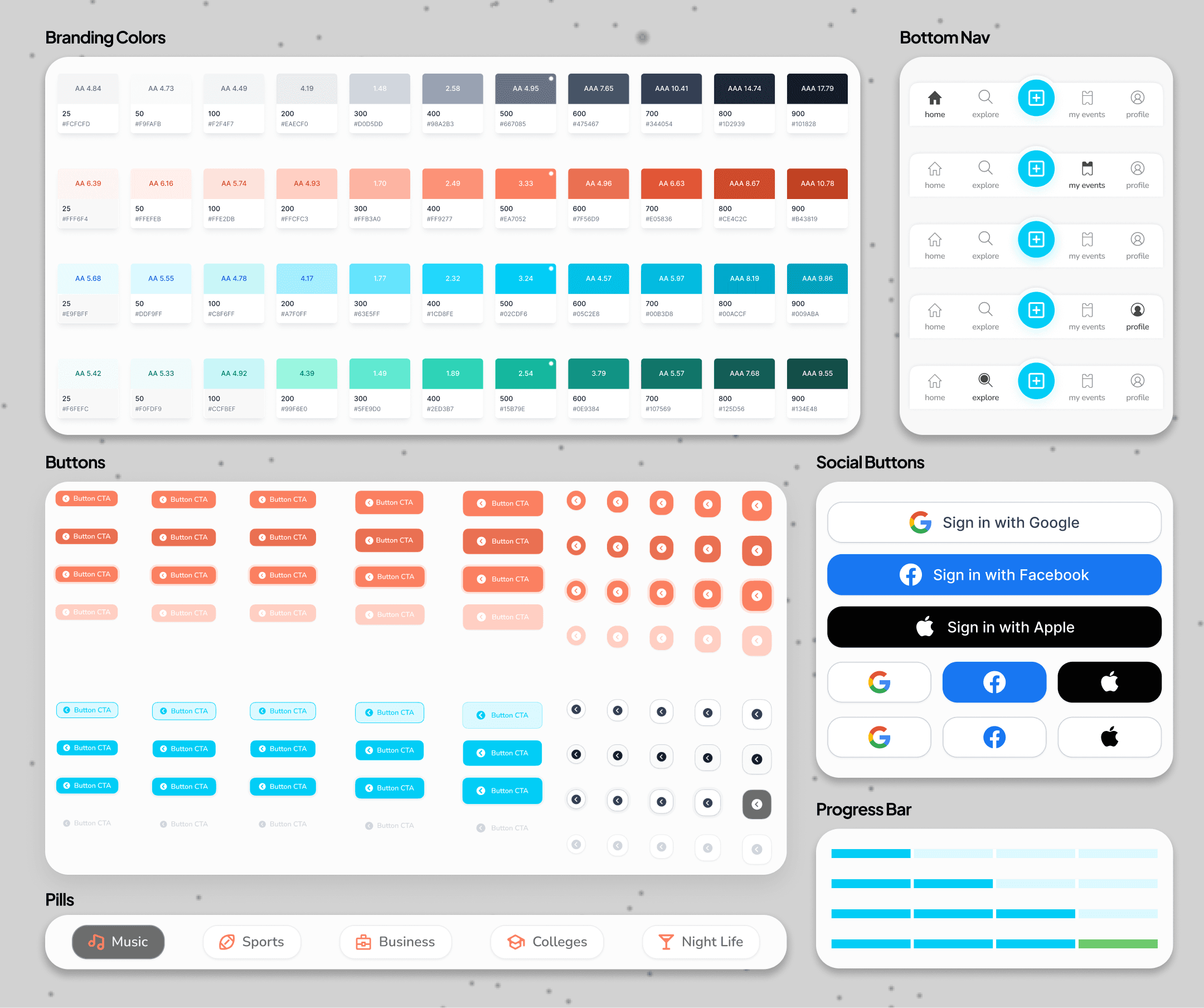
Reusable pieces included the step-based creation flow pattern, the dual-view event page editor, the multi-tier ticketing components with sales controls, the optional add-on widgets (performer lineup, sponsors, agenda, social links), and the template and branding controls.
05
Key Features
Quick Customization:
Users can instantly upload an event flyer, add a description, and choose brand colors, creating a visually engaging event page in seconds.
Flexible & Editable Anytime:
Event details can be updated later, reducing pressure on organizers who may not have all information finalized at the time of creation.
Dual-View Editing:
The editor supports both mobile and desktop previews, ensuring an optimized experience across all devices.
Streamlined Setup Process:
A step-by-step interface simplifies the design process, making it accessible to both first-time and experienced event creators.
Multi-Tier Ticketing:
Organizers can set up various ticket tiers with custom pricing, availability, and purchase limits to accommodate different audience segments.
Advanced Sales Controls:
Users can define start and end sale dates, max/min order quantities, and overall ticket capacity to optimize ticket distribution.
Integrated Ticket Perks:
Organizers can add exclusive ticket perks such as “Skip the Line,” “Backstage Access,” or VIP Benefits, ensuring attendees clearly understand the value of their purchase.
Seamless Management:
The intuitive interface allows for quick ticket creation and real-time adjustments, making event setup efficient and hassle-free.
Personalized Widgets:
Event creators can choose from a variety of customizable add-ons, including a performer lineup, event password, sponsor details, and social media links, to build a more engaging event page.
Enhanced Attendee Experience:
Organizers can include interactive features like an event agenda, featured song, podcast, or merchandise to provide attendees with deeper event engagement.
Flexible & Optional Additions:
These add-ons are completely optional, allowing event hosts to add as much or as little customization as needed, ensuring a streamlined setup process.
Seamless Integration:
Add-ons integrate directly into the event page, providing a cohesive and visually appealing experience for attendees.
06
Results
47% higher event completion rate
Breaking setup into guided steps raised the share of started events that reached publish from 51% to 75%, with casual first-time hosts driving most of the gain.
Event page built in under 3 minutes
Quick customization cut median time-to-first-published-page from roughly 12 minutes to 2.5, letting hosts get a live, branded event up in one sitting.
68% of events edited after publishing
Making every field editable after creation removed the pressure of finality, and most hosts took advantage, publishing early and refining details later rather than abandoning an unfinished setup.
2.3x more hosts using advanced ticketing
Layering multi-tier ticketing and sales controls beneath a simple default, instead of front-loading them, more than doubled the share of hosts who set up tiered or perk-based tickets.
41% of events added at least one optional add-on
With add-ons kept opt-in rather than required, a significant share of hosts reached for performer lineups, sponsors, or agendas without the base flow slowing anyone down.
Next
Most check-in tools try to show staff everything at the moment of scan, slowing the exact moment they mean to speed up, worst when venue wifi drops under a crowd. Research with scanners and attendees pointed the other way: at the gate, the only decision that matters is a fast, clear pass or fail. EQ Access Scan strips the scan to a camera frame and a single result, and defers attendee detail to where it actually gets used.