HeffOS — AI Interview Prep Tool
HeffOS — AI Interview Prep Tool
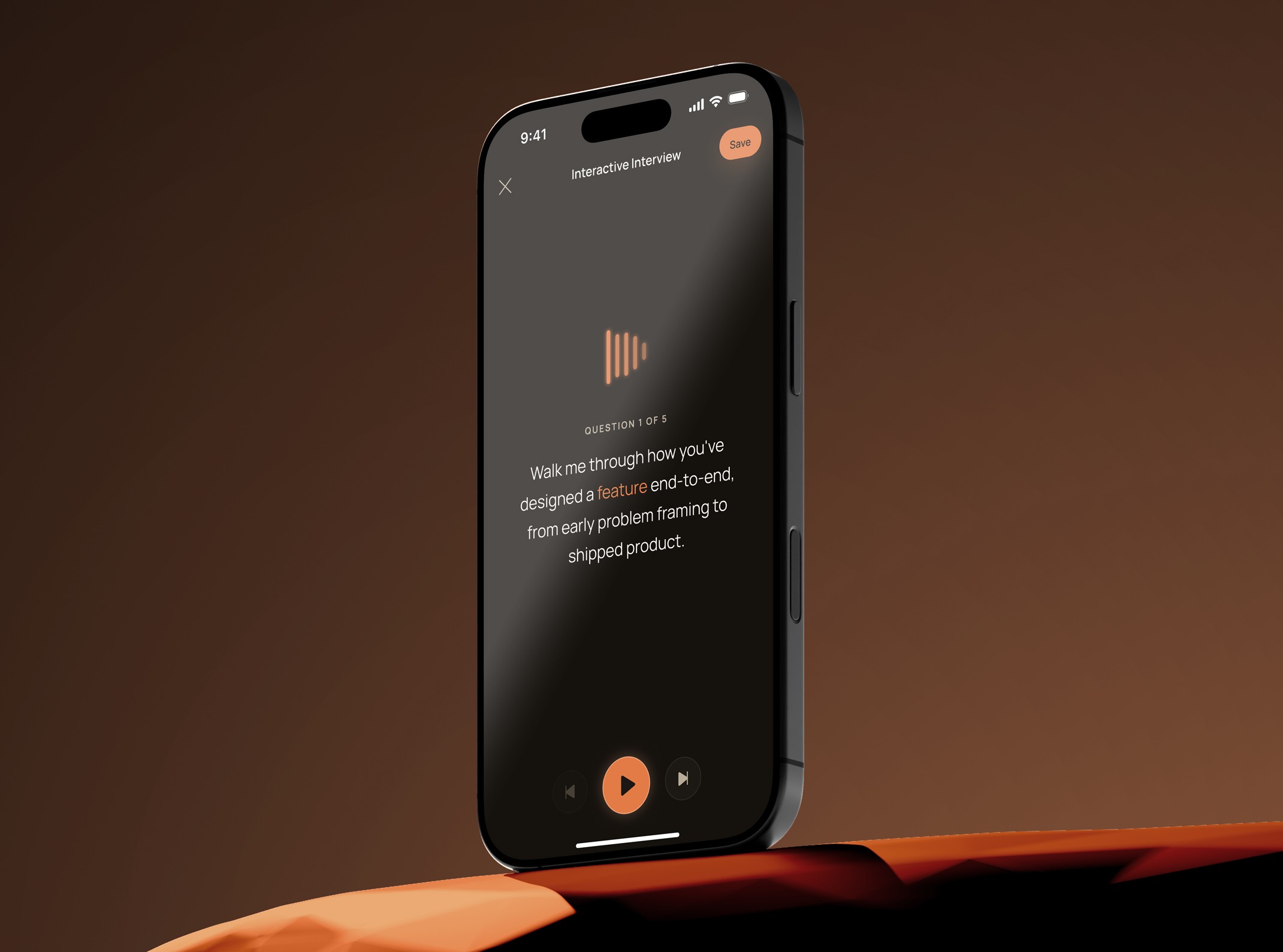
Interview Prep turns a tracked role in HeffOS into a live, spoken mock interview. An AI interviewer asks questions aloud, the user answers by voice, and each answer returns coaching feedback with a recommended response. It targets the highest-value, least-supported part of prep: rehearsing delivery out loud, something reading silently can't build and human mock interviews can't schedule on demand.
Year
2026
Client
HeffOS
Service
UX/UI Design
Role
Lead UX/UI Designer & Developer
01
Project Goals
Make spoken practice feel like a real interview, not a quiz
Objective: Recreate the pressure and pacing of a live interview so rehearsal transfers to the real thing.
Success Metric: A full question → spoken answer → feedback loop completes by voice alone, with typing available only as a fallback.
Sub-Goals:
Interviewer asks questions aloud rather than displaying them as text
Answers captured by speech, not typing, to train verbal delivery
Difficulty selection reframes the same role from warm-up to pressure-test
Turn-based pacing that mirrors the rhythm of a real conversation
Turn a multi-state interaction into one coherent linear flow
Objective: Hold a complex, mode-switching experience together so the user never feels lost between speaking, listening, and reviewing.
Success Metric: A user can move setup → question → answer → feedback → next question without a dead end or ambiguous state.
Sub-Goals:
Single forward-moving spine across six distinct interaction modes
Each screen has exactly one primary action
Mode changes (listening vs. speaking) are signaled by the interface itself
State is preserved across the loop so progress is never lost mid-session
Deliver feedback that improves the next answer, not just grades the last one
Objective: Make every answer produce a concrete, actionable upgrade rather than a score.
Success Metric: Each answer returns a specific "what could be better" plus a recommended answer the user can immediately re-attempt.
Sub-Goals:
Feedback tied to the user's actual spoken answer, not a generic rubric
A recommended answer shown alongside the critique as a model
Retry on the same question to apply the feedback immediately
Feedback framed as forward improvement, not pass/fail judgment
Ship a voice experience that survives mobile platform reality
Objective: Make a microphone-and-audio interaction actually work on the device people prep on — their phone.
Success Metric: Voice playback, voice capture, and answer pacing function reliably on mobile iOS Safari, the strictest target.
Sub-Goals:
Audio playback initialized from a real user gesture, not on load
Speech capture triggered only by an explicit tap
Word-by-word read-along that works without relying on unsupported browser events
Gesture and touch handling that avoids native mobile interruptions
02
Research and Discovery
This tool was built and validated as designer-as-user during an active job search. The problem space came from a real, recurring pain rather than a commissioned study, so discovery focused on mapping the existing prep options against the one need none of them met — practicing answers out loud, under realistic conditions, alone.
Competitive Analysis
Peer mock-interview platforms — high realism, but gated behind scheduling and another person's availability, so they can't be used in the moment before an interview.
AI interview coaches and answer graders — give feedback, but most are text-in / text-out, which trains writing rather than speaking.
Static question banks and prep articles — comprehensive content, zero rehearsal of delivery.
Generic AI chat — flexible and free, but no voice, no structure, and no connection to the specific role being targeted.
The gap across all four: none let a single person rehearse a spoken answer to a role-specific question and get an immediate, usable critique.
User Types
Active job seekers preparing for behavioral and role-specific interviews
Candidates who freeze on delivery despite knowing their material
Solo preppers without easy access to a mock-interview partner
Key Insights
The bottleneck is delivery, not knowledge — most candidates know their stories but have never said them aloud.
Practice that isn't spoken doesn't transfer; reading an answer and saying it are different skills.
Feedback only changes behavior if the user can retry the same question right away.
Prep tied to a specific tracked role beats generic practice, because answers are only as good as their context.
Journey Mapping
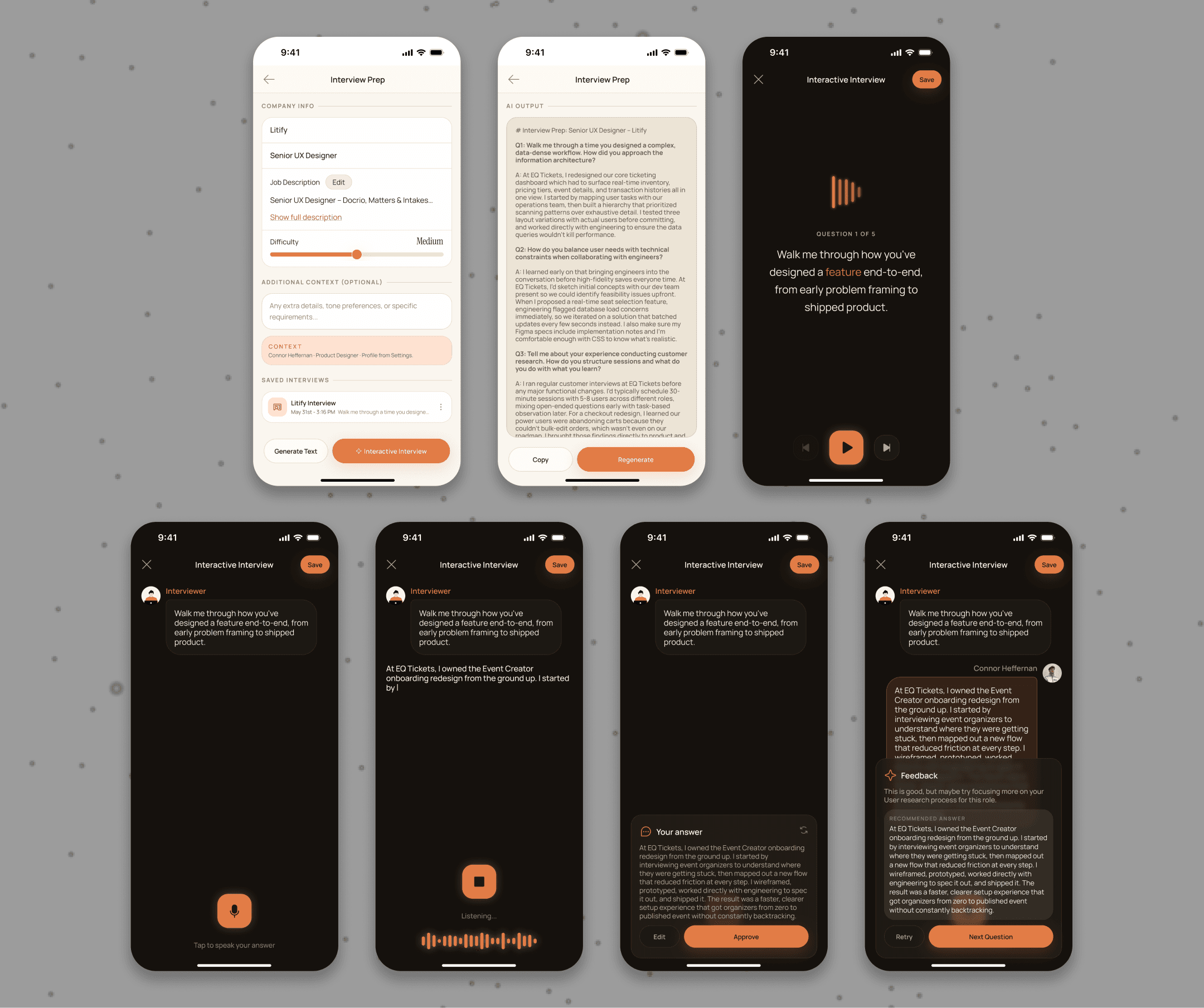
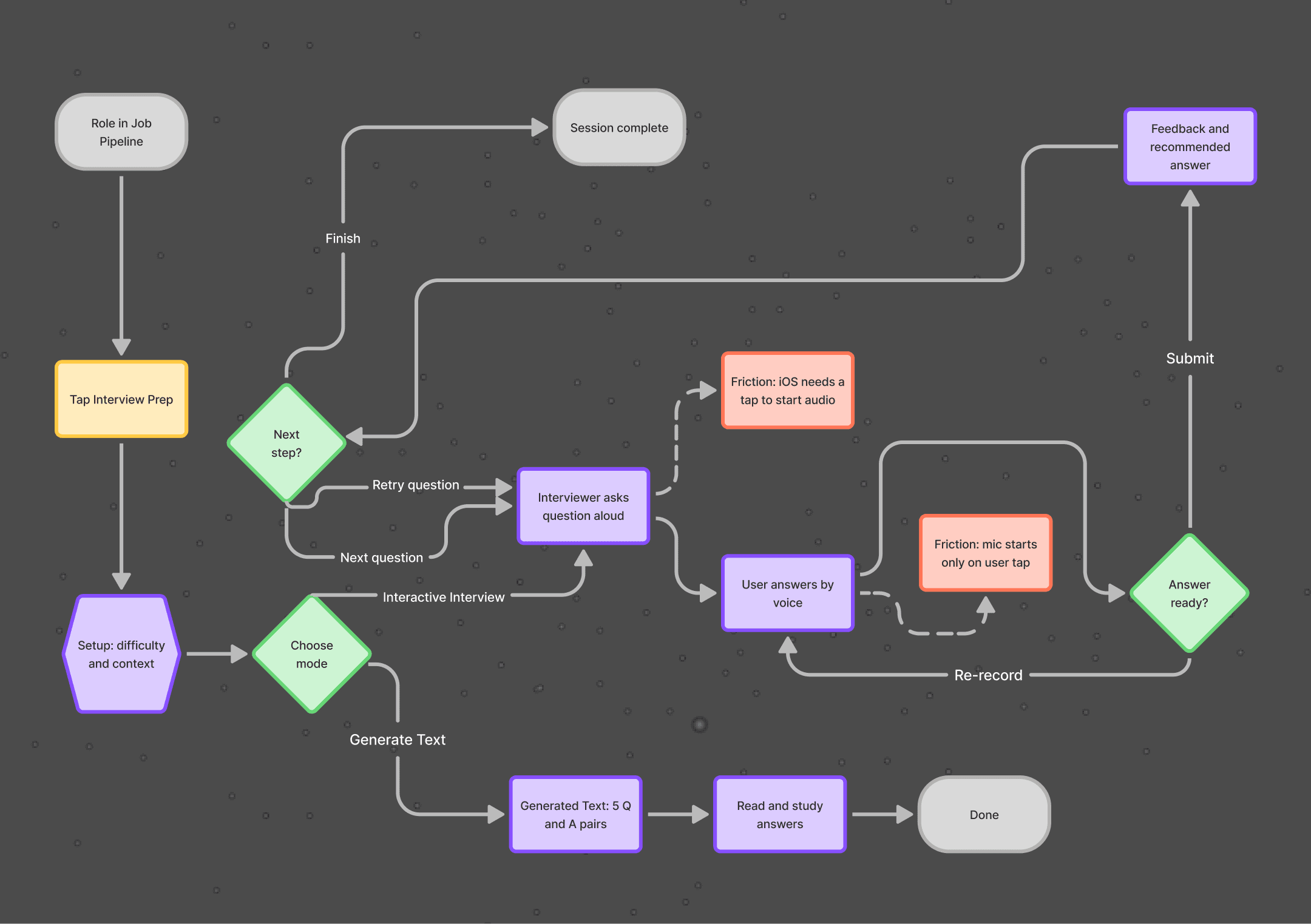
The core flow runs setup → spoken question → spoken answer → feedback → retry or next.
Friction concentrates at two seams:
the moment of starting to speak (where the user needs an unmistakable cue that the system is listening) and the moment of receiving feedback (where a score would stall progress but a concrete fix and a retry keep momentum). The flow was shaped to remove hesitation at both.
03
Key Findings
Voice is the entire point, not a feature.
Once answers were spoken instead of typed, the tool stopped being a study aid and started being practice. Every decision about pacing, transport controls, and feedback timing followed from protecting the spoken loop.
A voice interaction is really a state machine, and the design problem is the transitions, not the screens.
The hard part wasn't any single mode but keeping listening, speaking, and reviewing legible as one continuous interview. Designing the seams between states mattered more than designing the states themselves.
Platform constraints are product constraints.
Mobile browsers refuse to play audio or capture speech without a direct user gesture, and key timing events never fire on iOS Safari. These weren't bugs to patch later. They dictated where buttons go and how the read-along behaves, so they had to be designed for from the start.
Feedback has to be forward-facing to be used.
A graded answer ends the interaction. A specific improvement, a recommended answer, and an immediate retry turn one question into several reps. The feedback model was built to drive another attempt, not to close the loop.
04
Wireframing and Prototyping
Lo-Fi Sketches (Figma):
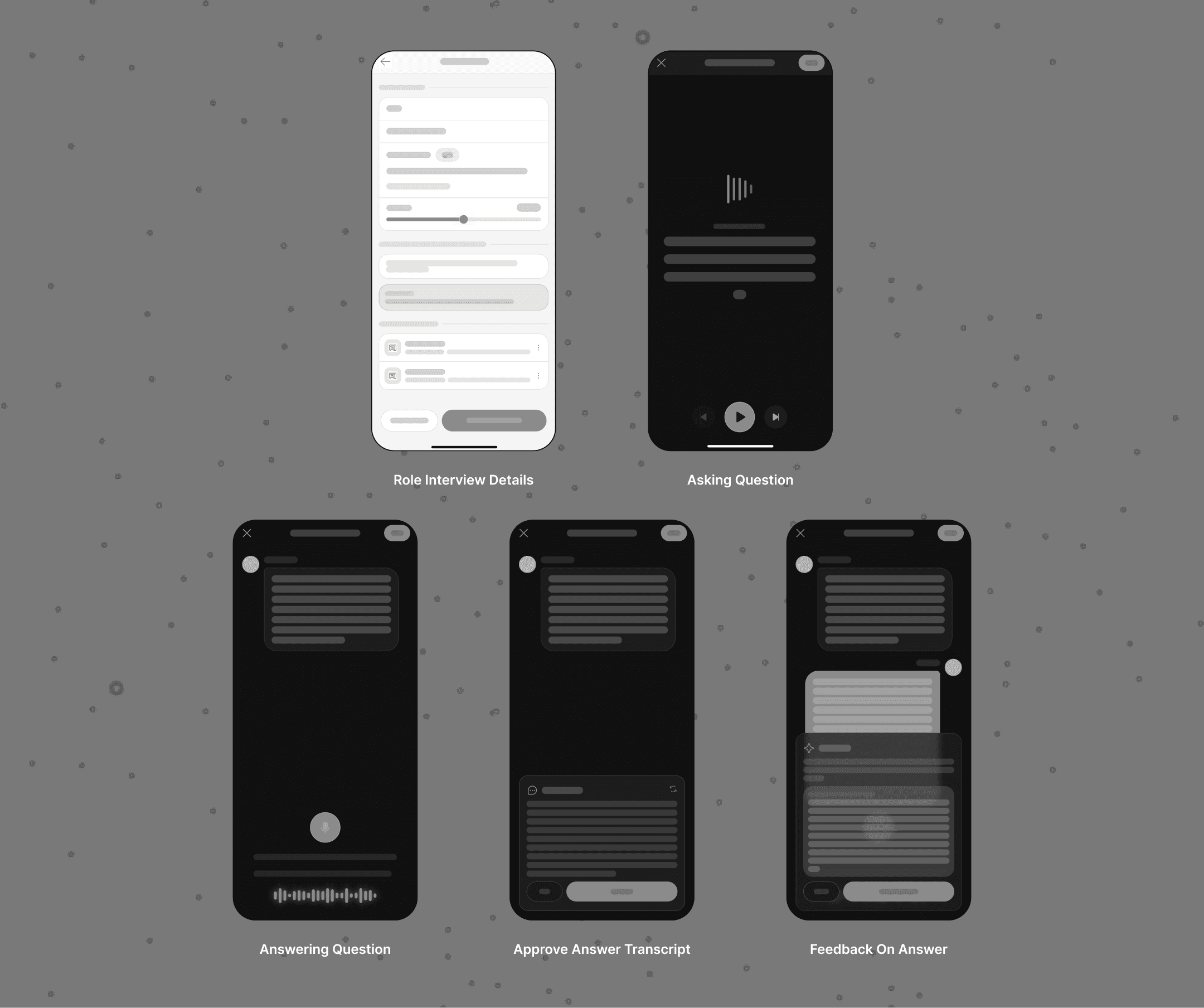
Early exploration focused on flow architecture, specifically how to carry a user through an entire interview without it fragmenting into disconnected screens.
Mapped the full interview loop from setup through feedback and the next question
Treated the interview as a sequence of modes rather than a set of pages
Established the forward spine of setup, asking, answering, and feedback before any visual treatment
Tested whether the loop read as a real conversation rather than a quiz
Mid-Fi Figma Prototypes:
Built clickable flows for:
Setup → Generated Question → Spoken Answer
Spoken Answer → Captured Answer → Feedback
Feedback → Retry or Next Question
Tested the two highest-friction seams, starting to speak and receiving feedback. This validated that listening and speaking needed visually distinct states, and that feedback had to surface a retry in the same view rather than send the user elsewhere.
Hi-Fi Interactive Prototypes:
Applied HeffOS brand styling, with the priority on making whose turn it is unmistakable at every moment.
Built distinct states for the speaking interviewer, the listening prompt, the captured answer, and the feedback exchange
Added real-time audio visualization so spoken turns felt live rather than static
Refined pacing and transport controls so the session moved like a conversation, not a form
Prototyped difficulty selection and how it reshapes the question set
Design System Development:
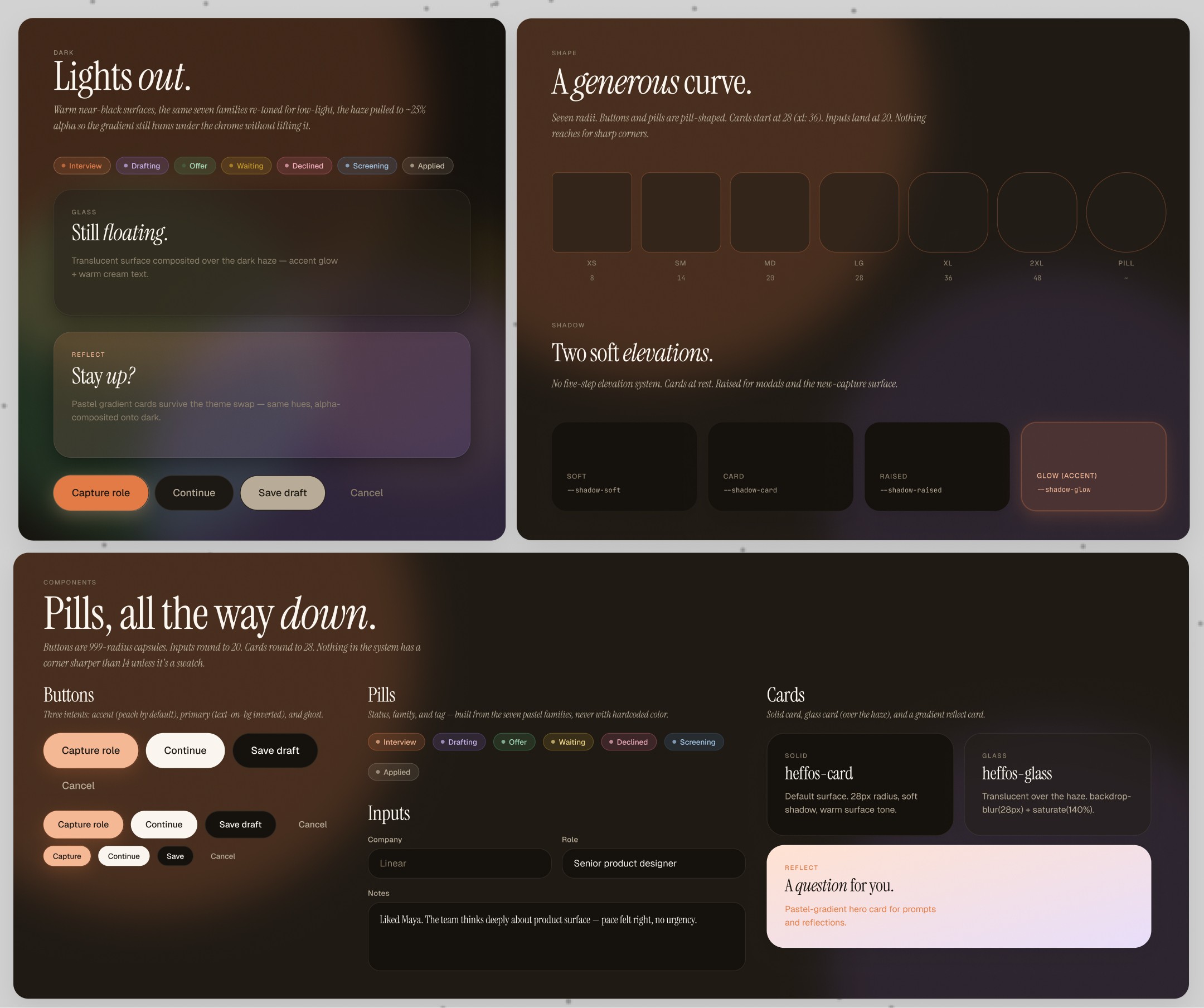
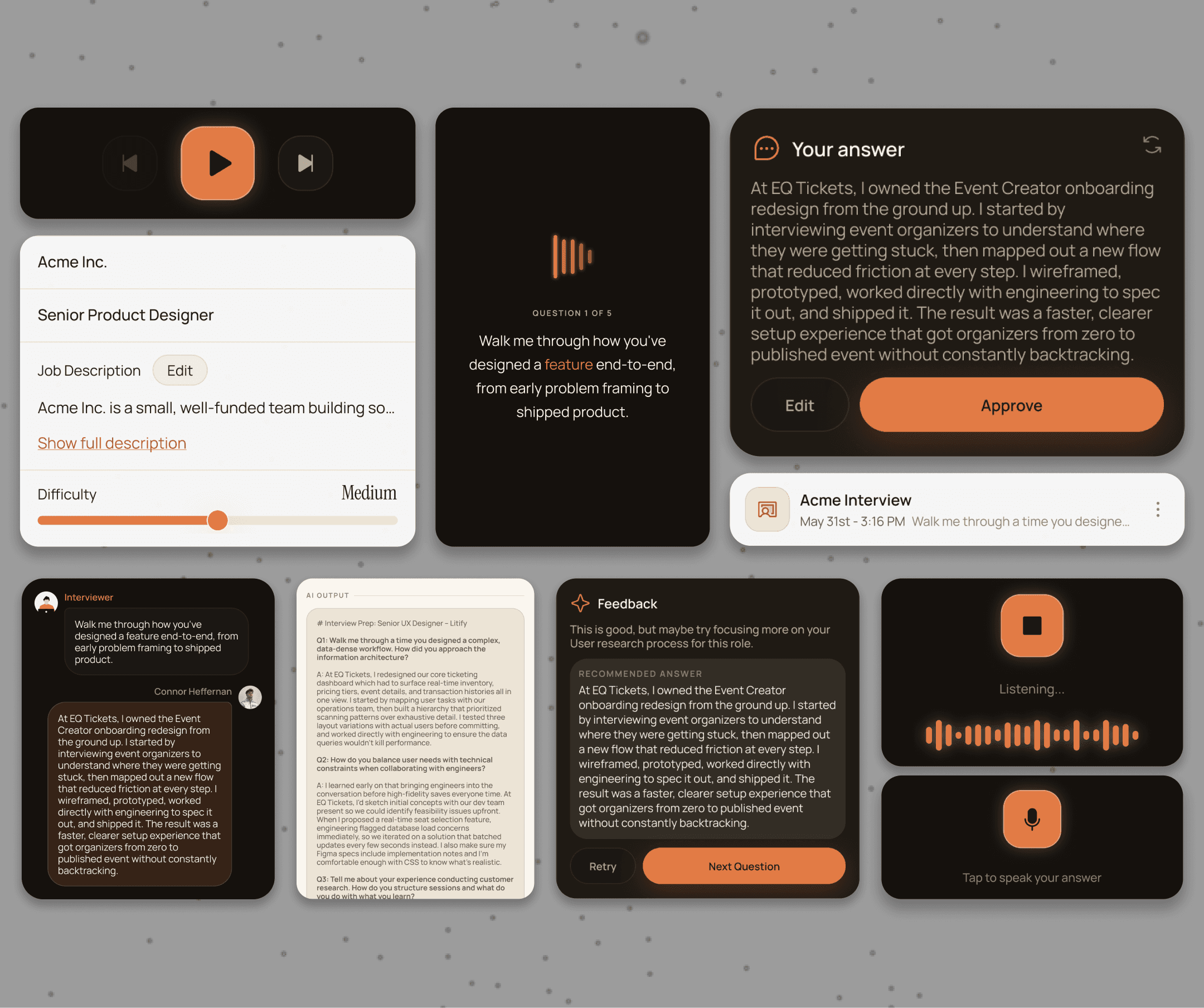
Extended the HeffOS component library for the interview experience.
Core components included:
Difficulty selector that reframes the question set
Speaking-interviewer state with read-along highlighting
Audio visualization for the interviewer voice and the user's answer
Tap-to-speak answer capture control
Transport controls (back, next, pause)
Feedback exchange layout reused across every question
Built on the shared HeffOS foundation: the full-page mobile takeover pattern (M_PAGE), warm off-white base with peach accent, and consistent header and control patterns, so the interview felt native to the rest of the app.
05
Key Features
Spoken Question Delivery:
The AI interviewer asks each question out loud, with a read-along highlight tracking the words as they are spoken. Hearing a question instead of reading it recreates the pressure of a live interview and trains the user to process and respond in real time.
Voice-First Answering:
Answers are captured by speech through an explicit tap-to-speak control rather than typed. This trains spoken delivery, the actual skill an interview tests, instead of letting the user quietly rewrite a polished answer on the page.
Difficulty-Scaled Question Sets:
Difficulty selection reframes the same role into easy, medium, or hard question sets. A user can warm up on softballs and then pressure-test the same material, so a single role supports repeated, escalating practice.
Role-Contextual Generation:
Questions are generated from the specific tracked role rather than a generic bank. Practice stays tied to the job the user is actually preparing for, which keeps both the questions and the feedback relevant.
Single Forward Spine:
The interview runs on one linear path: setup → generated question → spoken answer → captured answer → feedback → next question. Holding six modes on a single track keeps a complex interaction legible as one continuous conversation rather than a maze of screens.
One Primary Action Per Mode:
Each screen carries exactly one primary action. Removing competing choices means the user never has to stop and decide what to do next, which matters most in the high-focus moments of speaking and reviewing.
Distinct Listening and Speaking States:
The interface makes whose turn it is unmistakable, with visually separate states for the interviewer speaking and the user answering. Ambiguity about who should be talking is the fastest way to break the feeling of a real interview.
Persistent Session State:
Progress and prior answers are preserved across the entire loop. A user can move through questions, retry, and review without losing earlier work, so a long practice session never resets on them.
Answer-Specific Critique:
Feedback responds to what the user actually said rather than scoring against a fixed rubric. Tying the critique to the real answer makes it specific enough to act on instead of generic interview advice.
Paired Recommended Answer:
Every critique sits next to a recommended model answer. Showing a stronger version of the same response turns abstract feedback into a concrete target the user can imitate on the next attempt.
In-Place Retry:
An immediate retry on the same question lets the user apply the feedback on the spot. Closing the gap between hearing a fix and using it is what turns one question into real reps.
Forward-Facing Framing:
Feedback is framed as improvement, never as pass or fail. Keeping it constructive protects momentum, so the user keeps practicing instead of stalling on a bad score.
Next
CareLoop is a multi-sided home healthcare platform connecting caregivers and families. This case study focuses on the Scheduling & Care Management experience, designed to help families coordinate ongoing care, track visits, and manage care plans while giving caregivers structure and clarity after booking.